
Mark your days for the next schedule
For staff · 3 minute read · Checked
Before each 4-week schedule is built, you get a request sheet. It is where you ask for days off and mark the days you want to work.
The due date is at the top of the sheet. You can change your marks until then.
Fill in your sheet
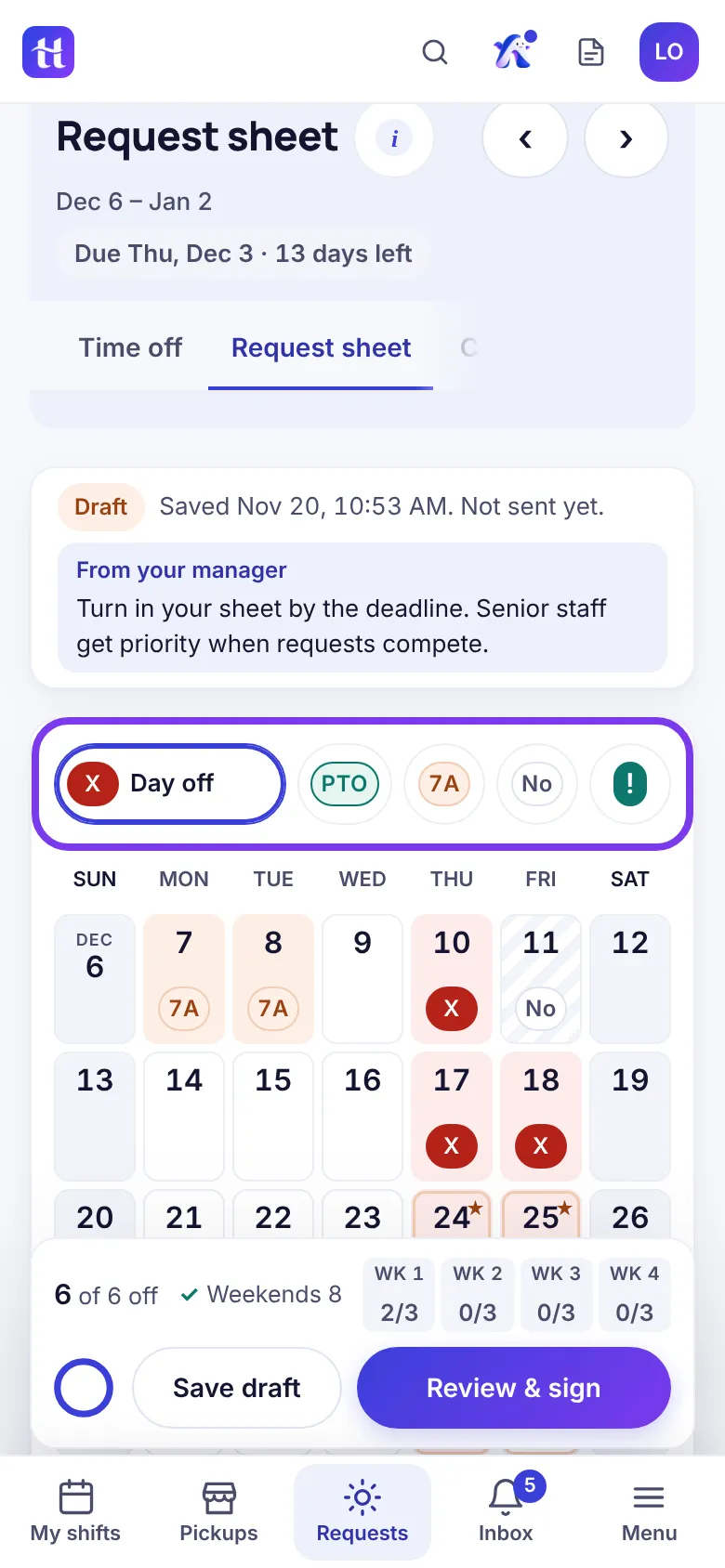
- Tap Requests, then Request sheetRequests is the third button at the bottom of your phone.
- Pick a markX is a day off you are asking for. 7A or 7P is a shift you want to work.
- Tap a dayThe day takes that mark. Tap it again to clear it.
- Tap Review & signSave draft keeps your marks for later. Review & sign shows what you asked for. Type your name there, then Submit my sheet sends it.
The other marks
PTO asks for a paid day off. ! is a day you would pick up an extra shift.
No means Can't work: please don't call me in for an extra shift that day. It is not a day off. Use X for those.
Good to knowYour marks are requests. The schedule is built to fit the hospital first, by seniority when asks compete.
Open my request sheet
Stuck? Ask your charge nurse. In AttuneOps, Report a problem is at the bottom of every page.